On this page
The main buying risk with these Gucci white slides isn't something you can judge just from the page saying "lightweight, non-slip." The last shape and size fields are incomplete. The page shows they're white slides, and the description mentions an upgraded lighter outsole with non-slip features, but these are just product page claims with no independent weight or slip tests. First, you need to address foot shape fit. The page lists sizes 39–45, but the description text says 38–44, which is incon
By Nathan ColeNathan Cole is Editor-in-Chief, covering residential and commercial lighting specification, LED driver behavior, illuminance and color measurement, and dimmer compatibility. They write most bulb and fixture reviews, keep the paper calibration log, and sign off on every final score. The bench protocol covers three illuminance distances, spectrometer readings at full, mid, and low dim, and a photodiode flicker run on the dimmer wall before scoring discussion. Every scored product requires a 30-day in-room period, and Nathan finalizes a score only when two of the three editors agree on the bench record.
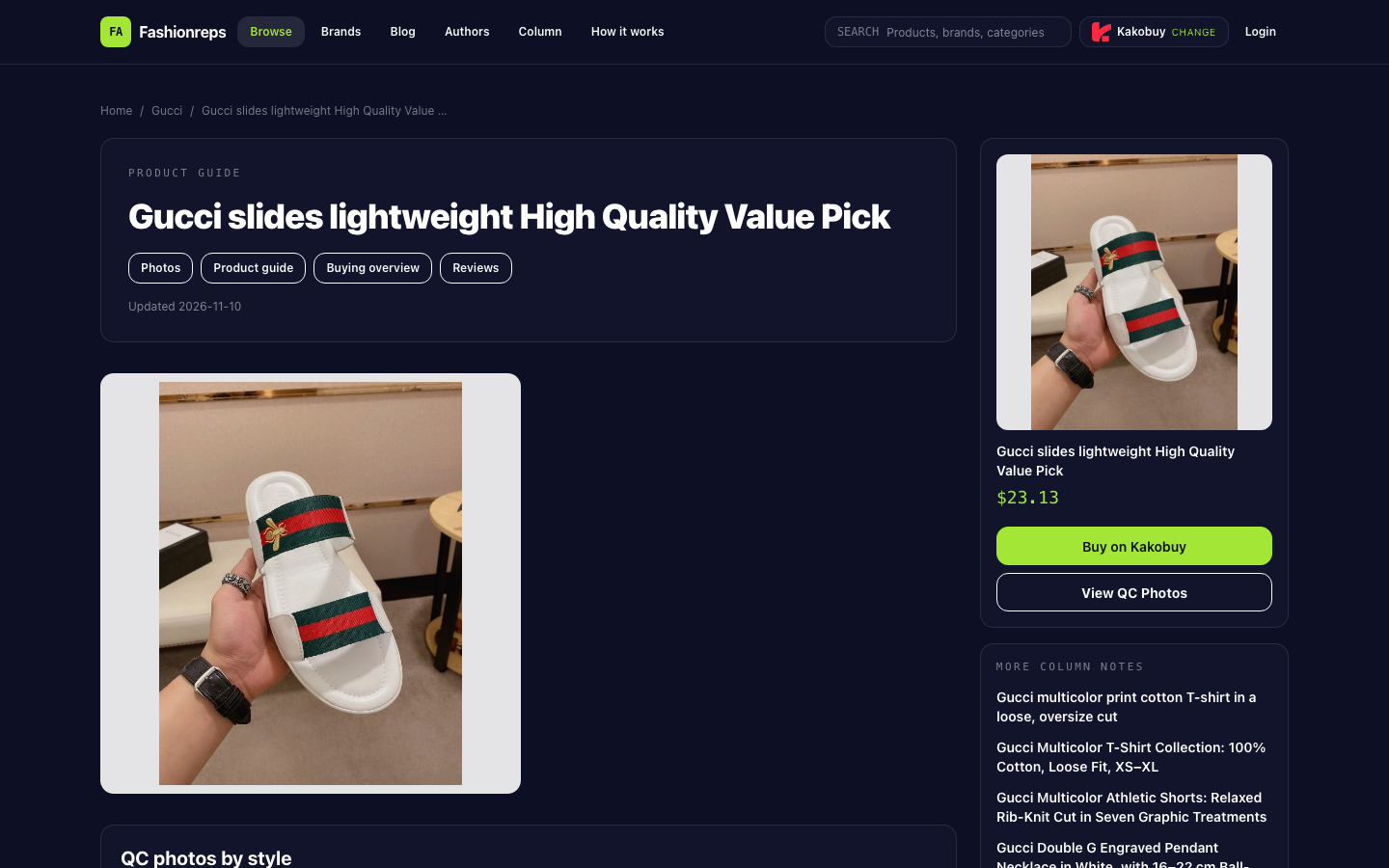
The main buying risk with these Gucci white slides isn't something you can judge just from the page saying "lightweight, non-slip." The last shape and size fields are incomplete. The page shows they're white slides, and the description mentions an upgraded lighter outsole with non-slip features, but these are just product page claims with no independent weight or slip tests.
First, you need to address foot shape fit. The page lists sizes 39–45, but the description text says 38–44, which is inconsistent. Meanwhile, separate buyer feedback about Gucci slides mentions they run narrow, true size might not fit, and long wear could cause blisters. However, this specific pair has no independent buyer reviews or wear tests, so you can't treat those brand-level clues as confirmed for this exact product.

Separate Two Issues: Fit Risk vs. Product QC
Sizing fit is about "can your foot fit comfortably?" QC is about "does the pair you receive match the page's style and workmanship expectations?" They can't replace each other.
| Question to judge | Evidence to look for | What the current page supports |
|---|---|---|
| Runs narrow? | Insole length, upper/strap opening width, forefoot width | Brand-level buyer clues say Gucci slides run narrow, but no independent wear data for this specific pair |
| Which size to choose? | Your foot length, width, target size measured data | Page shows both 38–44 and 39–45, so don't order based on just one set |
| Matches the style? | Upper, stripes, sole, and left/right details photos | Request QC photos from the right angles before shipping |
| Outsole really light and non-slip? | Actual outsole details and specs or tests | Only product description, no independent measurements or slip tests |
Step 1: Measure Your Feet, Not Just Pick a Size
Measure in the afternoon or evening because feet swell slightly compared to morning. Wear the socks you'd pair with these slides, or stand as you'd actually wear them barefoot, and record foot length and widest width. If left and right differ, use the larger foot.
Foot width matters a lot. The page's buyer clues point to a narrow fit, so don't just use your usual sneaker size. For wide forefoot, high instep, or areas prone to rubbing, consider width and opening space before the size number.
Step 2: Request Target Size Measurements Before Paying
Don't just ask "is it true to size?" Have the seller or agent provide these for your intended size:
- Actual insole or footbed length
- Actual width at the widest part of the insole
- Width of the upper opening or strap area
- Forefoot width of the sole
- Actual markings for the size listed
These measurements must be for your target size, not another pair or a generic size chart. Since the page lists both 38–44 and 39–45, first confirm whether your target size is actually available and which size the seller's measurements correspond to.
If they can only confirm "we have 39–45" but can't explain the 38–44 in the description or provide target size measurements, wide-foot buyers shouldn't pay based on the page's size range alone.
Step 3: Request QC Photos in Risk Priority Order
After confirming foot measurements, check the actual QC. Request photos in this order:
- Size tag or marking on your target size to confirm the shoes match your order.
- Front and top views of both shoes together to check the white upper, overall shape, and left/right symmetry.
- Close-up of the upper or strap area to see opening width, edge evenness, and any obvious dents or deformation.
- Close-up of stripes or decorative pattern to confirm position, direction, and left/right symmetry.
- Full sole and forefoot close-ups to check tread completeness and see the actual structure of the claimed lightweight, non-slip outsole.
- Insole and footbed photos to combine with measured length/width to assess narrow-fit risk.
These photos help judge style and visible workmanship, but they don't prove comfort or replace actual slip testing. The page clearly has no independent comfort testing for this product, so don't treat "non-slip" in the description as a third-party verified performance claim.
Make Your Decision Based on Foot Type
Narrow-foot buyers can proceed, but still confirm target size, size tag, and insole measurements first, then check upper and sole QC. If all consistent, narrow-fit risk is easier to manage.
Average-foot buyers shouldn't just go with their usual size. Compare your foot length and width to the target size measurements; if you only get a size range and no width or insole data, you still lack enough to decide.
Wide feet, high instep, or blister-prone buyers face the highest risk. The page's brand-level feedback already hints at narrow fit and blistering, and this specific item has no independent reviews. If the seller can't provide target size width, opening, and insole photos, or can't explain the 38–44 vs. 39–45 discrepancy, it's safer to hold off rather than rely on "size up half" folklore.
Minimum Checklist Before Ordering
- Confirm whether available sizes are 38–44 or 39–45.
- Have the seller clarify the size tag and measurements for your target size.
- Record your foot length and widest width, and compare with insole and forefoot width.
- Request target size QC photos of upper opening, stripes, sole, and insole.
- Treat "lightweight, non-slip" in the description as a page claim, not an independent test result.
- Check the agent's or seller's return/exchange policy, especially for size mismatch and item-not-as-described cases.
These white slides aren't automatically unbuyable just because of narrow-fit clues on the page. The key is to get fit data first, then inspect QC photos for the exact size. If the seller can explain the size field discrepancy, provide target size width measurements, and give complete upper and sole photos, you have a basis to proceed; with only style images and a vague size range, you can't confirm fit.
Editor score 4.2 / 5