On this page
The reference price, coupons, and checkout discounts shown on Kenzo product pages are not the same type of information. When a coupon fails, don't repeatedly claim it or submit orders. Instead, check it step by step against validity period, order conditions, product exclusions, and checkout prompts. This guide provides a verifiable troubleshooting process only, not coupon codes or savings promises unconfirmed by current official sources. 🔎 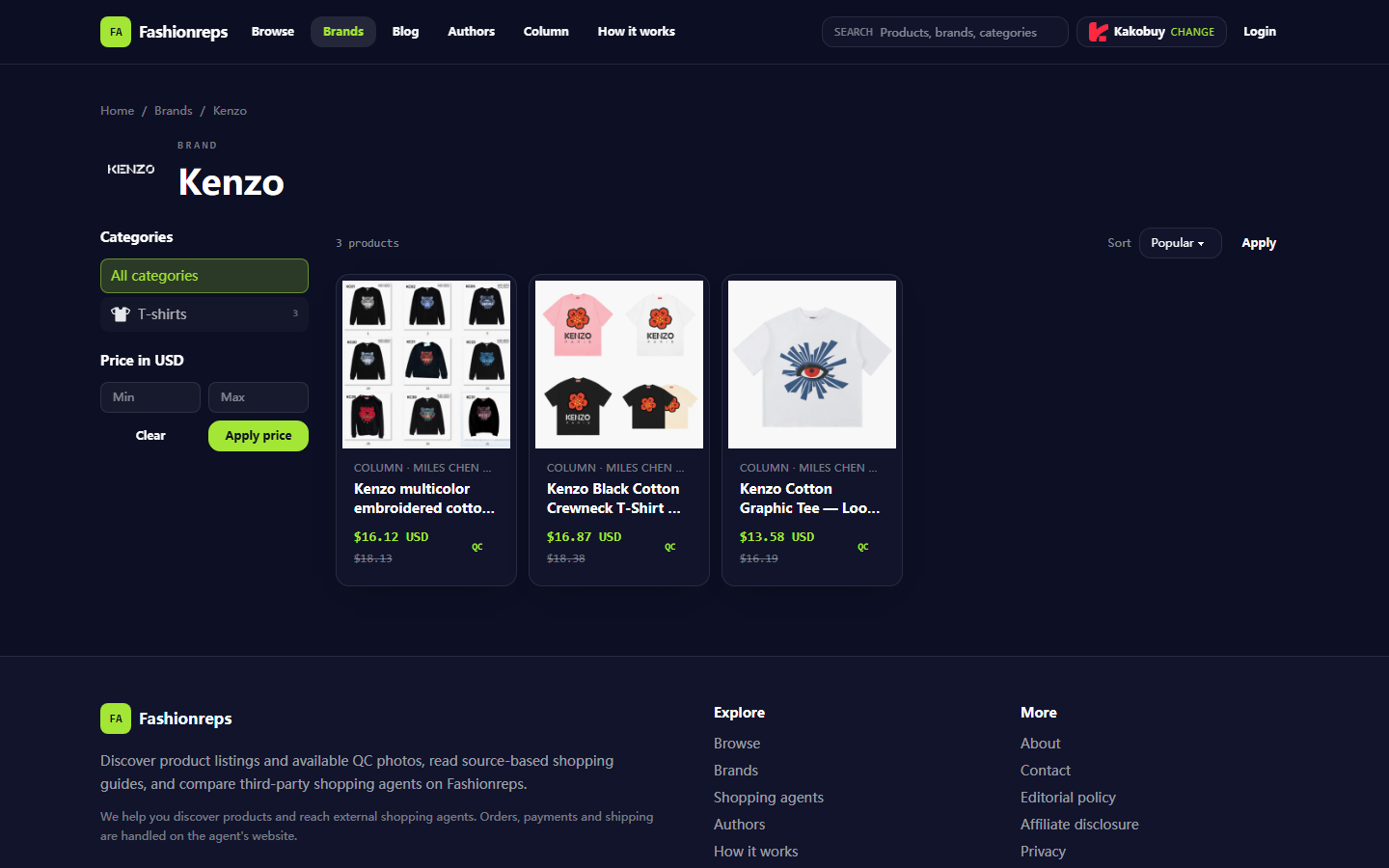
The reference price, coupons, and checkout discounts shown on Kenzo product pages are not the same type of information. When a coupon fails, don't repeatedly claim it or submit orders. Instead, check it step by step against validity period, order conditions, product exclusions, and checkout prompts. This guide provides a verifiable troubleshooting process only, not coupon codes or savings promises unconfirmed by current official sources. 🔎
Kenzo brand page with product listings and reference price information
A Single User Task for Kenzo Coupon Issue Troubleshooting
This article addresses a specific problem: after adding Kenzo products to the cart, the coupon doesn't work, or the discount amount shown at checkout differs from expectations.
After troubleshooting, you should be able to determine one of the following three outcomes:
- The coupon conditions are met, and you can proceed to checkout.
- Verifiable information is still missing, and you need to save page evidence and confirm with the actual shopping agent.
- The coupon clearly doesn't apply, and you should stop repeated attempts to avoid order or payment issues caused by repeated submissions.
Fashionreps is mainly used for discovering products, viewing product information, and available QC photos. After clicking to purchase, orders, payments, warehousing, and logistics are handled by external shopping agents chosen by the user. Therefore, the reference price on Fashionreps product pages cannot automatically prove that an external agent will accept a particular coupon, nor can it replace the final amount on the agent's checkout page.
First Check the Fashionreps Kenzo Product Page and Specification Options
Before checking the coupon, first confirm that you are on the correct product page. The current Kenzo brand page shows 3 product entries, including long-sleeve, short-sleeve, and crew-neck styles; the page also displays product names, some specification information, and reference prices. Reference prices should only be recorded as page display information and cannot be directly used as the final selling price, inventory, or discounted price.
It is recommended to save the following evidence:
- Product name or product page title.
- Product page URL and verification date.
- Color, size, and other specification options.
- Reference price and original reference price displayed on the page.
- Whether the product can still be opened normally, and whether there are blank pages, redirects, or unavailable specifications.
- Whether the product title, specifications, and price are consistent after entering the selected shopping agent.
If the product name, specifications, or price on the page have changed, stop judging the coupon first. If the product itself is misidentified, even if the coupon code format is correct, it may fail because the product is not within the applicable range.
How to Save Evidence for Coupon Status, Claim Time, and Validity Period
When there is no current official coupon information or verifiable coupon code, do not fill in a speculated coupon code, nor treat old pages, search summaries, or other users' screenshots as current rules. First confirm the source of the coupon: whether it is from the shopping agent's account coupon center, the agent's official announcement, a product page activity notice, or third-party shared content.
When verifying, record:
- Coupon name or officially displayed identifier.
- Claim time and usage status.
- Start time, end time, and applicable time zone.
- Whether login, account binding, or specific claim steps are required.
- Whether the coupon shows as unclaimed, available, used, expired, or unavailable.
- Whether the page clearly states the applicable site, currency, and order type.
The validity period should be based on the time and time zone currently displayed on the actual shopping agent's page. Just seeing a "limited-time offer" or an old screenshot cannot prove that the coupon is still valid. If the page does not clearly state the validity period, do not infer a deadline on your own. 📅
How to Check Order Thresholds, Product Exclusions, and Payment Restrictions Item by Item
Coupons usually do not automatically apply to all products and all orders. You should check the specific conditions in the shopping agent's coupon description or checkout page, including:
- Whether the minimum order amount is calculated based on product subtotal, tax-inclusive amount, or another amount.
- Whether shipping fees, service fees, warehousing fees, and insurance fees count toward the threshold.
- Whether Kenzo products are excluded brands, excluded categories, or outside the designated activity scope.
- Whether the order requires specific products, designated warehouses, or specific shopping channels.
- Whether the offer applies only to new users, first orders, or specific accounts.
- Whether there are restrictions on destination country, delivery region, currency, or payment method.
- Whether a specific logistics route is required, or certain delivery services are excluded.
- Whether there are usage limits per account, per order, or per time period.
Do not try to meet the threshold by splitting orders, under-declaring prices, or circumventing destination country checks. Customs declaration, import restrictions, and taxes should be handled according to destination country regulations and the agent's current instructions. 🧾
If the coupon requires an order amount threshold, use only the amounts actually listed on the checkout page for judgment. The product reference price, cart estimate, and final payable amount may be at different stages and should not be confused.
How to Distinguish Checkout Prompts, Undiscounted Amounts, and Other Fees
When a coupon fails, first observe the specific prompt on the checkout page, rather than just looking at the final total. Common situations include: coupon not selected, coupon expired, order amount insufficient, product not eligible, offer cannot be stacked, payment method inapplicable, and the discount has been applied but offset by other fees.
Check in the following order:
- Confirm that the current account and order use the same coupon source.
- Confirm that the products, colors, sizes, and quantities in the cart have not changed.
- Check whether the product subtotal meets the official threshold.
- Check whether the coupon has been actively selected and shows as applied.
- Record the pre-discount product subtotal, discount amount, shipping fee, service fee, tax, and final payable amount.
- Confirm whether the page states that the discount only reduces product amount, or also applies to shipping or service fees.
- Before changing payment method, save the current prompt to avoid being unable to determine which step changed the amount.
A decrease in product amount but no significant decrease in the final total does not necessarily mean the coupon failed. Shipping, service fees, taxes, or insurance may be calculated independently. Conversely, if the checkout page clearly shows a discount amount of zero or prompts ineligibility, do not treat the difference in reference prices on the page as a discount.
Review Sequence When Stacking Is Not Allowed, Used, or Page Expired
When the page prompts that stacking is not allowed, first check whether any automatic activity, account discount, or logistics offer has been applied. Do not repeatedly add multiple coupons at once, nor guess which coupon is effective based solely on total price changes.
The recommended review sequence is:
- First remove unconfirmed coupons and record the checkout amount without any coupons.
- Reconfirm the current coupon's status, validity period, and applicable conditions.
- Add only one eligible coupon and observe whether the checkout prompt changes.
- If the system shows as used, confirm whether it corresponds to another order or a previously failed order that still occupies eligibility.
- If the page shows expired, save the expiration prompt and page time, and do not continue to submit payment.
- If the coupon center and checkout page conflict, rely on the checkout page's clear prompt for the current order, and verify with the actual agent's customer service.
If duplicate charges, unclear order status, or occupied coupon eligibility occur, first address the order status and do not continue creating new orders. This reduces the risk of duplicate orders and duplicate payments. ⚠️
How to Write Only Verification Processes When There Is No Current Official Coupon Information
When there are no confirmed official coupon codes, discount percentages, minimum purchase amounts, or applicable periods, the only safe content to write is the verification process: open the actual shopping agent's official coupon page or account coupon center, confirm current rules, then add Kenzo products to the cart and verify on the checkout page.
The following cannot serve as proof of a current offer:
- Coupon codes from old articles or old screenshots.
- Social media shares without dates and applicable regions.
- Other users' personal order amounts.
- Differences in reference prices on Kenzo product pages.
- Unexplained changes between cart estimate and checkout page.
- Third-party text claiming "guaranteed to work" or "guaranteed savings."
If official instructions cannot be found, the safest approach is to keep order drafts and page evidence, and ask the actual shopping agent about the coupon's applicable conditions, rather than fabricating or repeatedly trial-and-error. 📌
Conditions for Retrying, Submitting Information, or Stopping After Troubleshooting
After confirming the coupon is valid, the product meets conditions, the order reaches the threshold, and the checkout page clearly shows the discount amount, you can proceed to check payment and shipping information. Before submitting, reconfirm the destination country, currency, delivery address, and applicable tax instructions.
If the page prompts you to contact customer service, provide only the necessary information required for the order or cart. Do not disclose passports, full payment card numbers, complete waybills, or other unnecessary personal data. Screenshots should cover addresses, phone numbers, order numbers, and payment information, while retaining parts that prove the product, coupon status, and checkout prompt.
Stop retrying in the following situations:
- The coupon has clearly expired or been used.
- The product is excluded, and official rules have no exception.
- The order amount does not meet the threshold, and adding more items just to meet the coupon does not fit actual needs.
- The checkout page cannot stably display the final amount.
- Payment failed but order status is unclear.
- The agent's customer service has not confirmed the rules, and you cannot afford the risk of repeated payments or coupon failure.
Only when the official page or the actual checkout page clearly shows the discount amount can the reduction be considered confirmed. This article does not provide unverified savings amounts, nor recommend buying unnecessary products, splitting orders, or circumventing taxes and customs requirements in order to get a discount.
Article Image

Editor score 4.2 / 5