On this page
When viewing a product on fashion-reps and returning to your cart, if you find the brand, style, color, size, or quantity no longer matches your original selection, do not proceed with payment or repeatedly resubmit the order. First determine whether the change occurred on the product page, in the cart, or in the order draft, then decide whether to correct it, re-save it, or hold off on ordering. 🛒 This article addresses one specific issue: montblanc
By Nathan ColeNathan Cole is Editor-in-Chief, covering residential and commercial lighting specification, LED driver behavior, illuminance and color measurement, and dimmer compatibility. They write most bulb and fixture reviews, keep the paper calibration log, and sign off on every final score. The bench protocol covers three illuminance distances, spectrometer readings at full, mid, and low dim, and a photodiode flicker run on the dimmer wall before scoring discussion. Every scored product requires a 30-day in-room period, and Nathan finalizes a score only when two of the three editors agree on the bench record.
When viewing a product on fashion-reps and returning to your cart, if you find the brand, style, color, size, or quantity no longer matches your original selection, do not proceed with payment or repeatedly resubmit the order. First determine whether the change occurred on the product page, in the cart, or in the order draft, then decide whether to correct it, re-save it, or hold off on ordering. 🛒
This article addresses one specific issue: montblanc product details becoming inconsistent after being added to the cart. After reading, you should be able to complete a pre-payment review and determine when to contact your chosen shopping agent or stop the process. This article does not apply to orders that have already been paid for, entered warehouse processing, or whose product links are no longer valid.

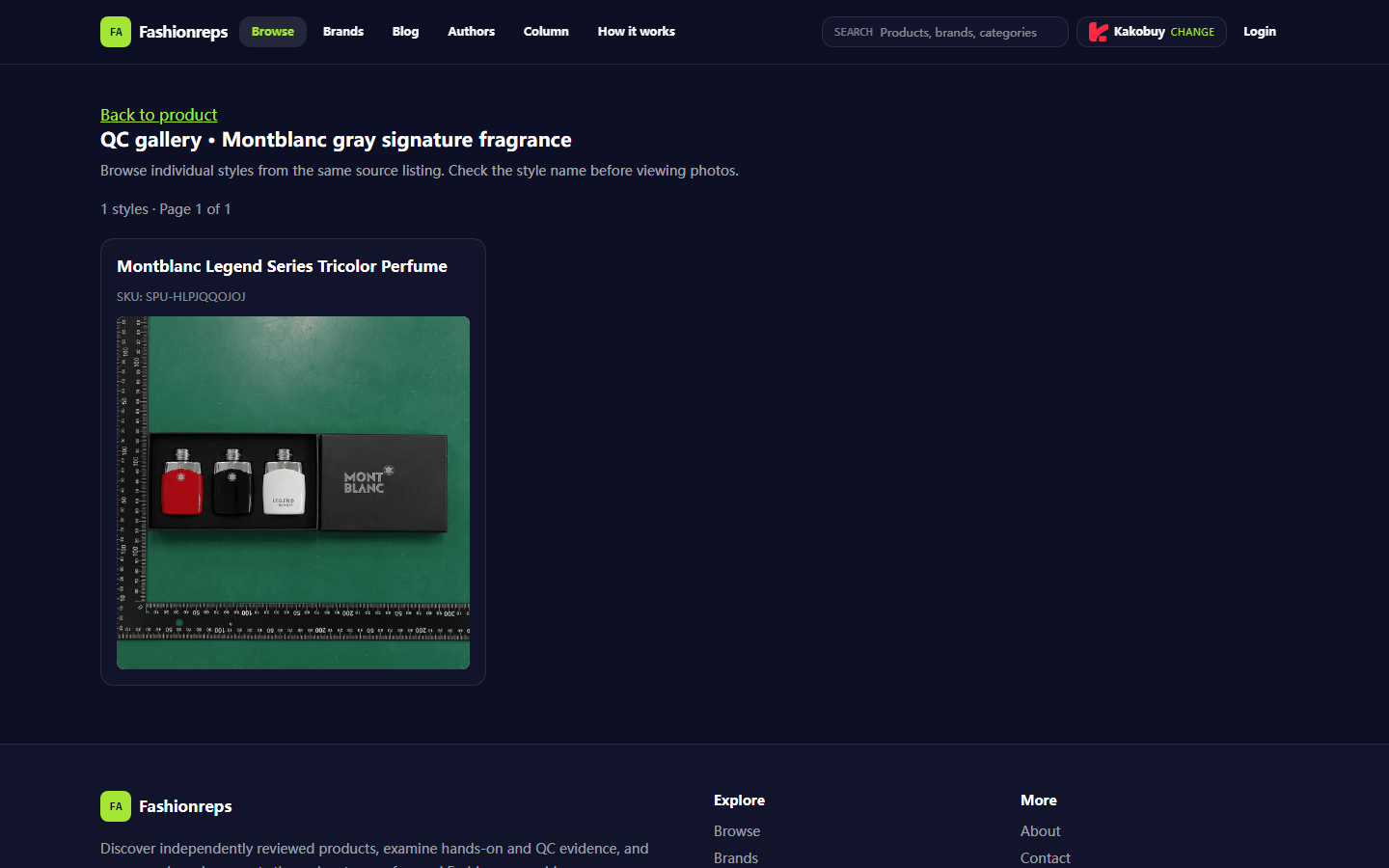
Image: Montblanc product information visible on fashion-reps product and QC pages. The image is for page context verification only and does not represent a completed purchase, receipt, or physical testing.
Clarify the Specific Issue of montblanc Cart Variant Review
Write down the "mismatch" as fields you can verify, rather than just noting "the cart is wrong." At minimum, check the following:
- Brand or product name is still montblanc.
- Style name matches the product details page.
- Color, version, or capacity has not changed.
- Size field has not been cleared, overwritten, or reset to default.
- Quantity has not changed from the originally entered value to 1 or another number.
- Product link, SKU, or seller information still corresponds to the original product.
fashion-reps is designed to help users discover products, view independent reviews or QC information, and hand off the purchase process to the user's chosen shopping agent. Visible page information indicates that orders, payment, and shipping are handled by the agent's website. Therefore, the fields on fashion-reps pages may not necessarily belong to the same system as those in the agent's cart, so you cannot rely on just one source when verifying.
Save Visible Evidence of the Product Details Page, Cart, and Order Draft
Before refreshing the page, going back, or re-selecting options, save three sets of evidence. Screenshots should include the product name, option fields, quantity, SKU or link fragment, and page timestamp; address, phone number, order number, payment information, and other personal data should be redacted. 🔐
The first set is the product details page evidence: record the product title, style, visible options, product link, and page SKU. The provided QC page summary shows the style name "Montblanc Legend Series Tricolor Perfume" and SKU: SPU-HLPJQQOJOJ. This information can only serve as a page verification clue and cannot replace the final fields in the shopping agent's cart.
The second set is the cart evidence: capture the product row, selected options, quantity, price display, and the chosen agent's name. Do not only capture the total price, as it cannot prove that color, size, or style was not reset.
The third set is the order draft evidence. If the agent website provides a save draft, order confirmation, or warehouse pre-alert page, record the visible fields first, but do not click the final payment or submit button. If the page has no order draft, clearly mark it as "no order draft generated yet," and do not write the cart status as order status.
Compare Brand, Style, Color, Size, and Quantity Fields
Check item by item in the following order:
- First compare the product name and style. When product titles are similar, prioritize checking the SKU, style suffix, and option names in the images.
- Then compare color, capacity, or version. If the product has no color or size options, record "field not provided on the page" and do not fill it in yourself.
- Check the quantity. Confirm that the quantity in the input box, cart line, and order draft are the same.
- Check the product link or seller. If the cart link redirects to a different product, pause and do not continue payment just because the titles are similar.
- Finally, compare the price and shipping display. A price change alone cannot prove a variant change, but it can indicate that the cart may have re-read options or seller information.
If a field exists on the product details page but is empty in the cart, or if the cart displays options not from the original page, mark the status as "to be confirmed" rather than assuming the system kept the original selection. ✅
Check Whether Options Were Reset or Omitted After Returning to Cart
Variant refill anomalies commonly occur in these verifiable situations:
- After returning from the product details page, options revert to default.
- After page reload, a variant field disappears.
- After modifying quantity, the cart regenerates a product line, causing the option display to change.
- The cart contains products from different links or sellers.
- The agent page shows only partial variants, and hidden fields cannot be confirmed.
- The product page and agent page use different field names, making options appear the same but not actually correspond.
Do not "test" for the correct result by repeatedly refreshing, clicking add to cart multiple times, or submitting multiple times. This may generate duplicate product lines or multiple drafts, making it harder to judge. Record the current state first, then make only one controlled correction. If the page has a save button, save and reopen the same cart item to check if fields persist; if there is no clear save confirmation, do not treat the button click as a successful save. ⚠️
Distinguish Between Page Display, User Input, and Unconfirmable States
It is recommended to classify evidence into three categories:
- Page display: fields explicitly visible in screenshots or page text.
- User input: fields you actually selected or entered, ideally with records before and after selection.
- Unconfirmable: fields not shown, truncated, failed to load, or cannot be mapped between pages.
For example, the product details page showing a certain style only proves that the details page displayed that style at that time; the cart must also display that name to prove the cart currently displays it. If the names are the same but SKU, color, or quantity are not shown, you still cannot confirm that all variants match.
Before payment, you can create a short verification record:
- Product name: detail page value / cart value
- Style or SKU: detail page value / cart value
- Color or capacity: detail page value / cart value
- Size: detail page value / cart value
- Quantity: user input value / cart value
- Status: consistent, needs correction, or unconfirmable
Only proceed to the next step of order confirmation when all required fields show consistency and there is no conflict in links or SKU. For missing fields, do not substitute product images, title keywords, or personal experience for clear page evidence.
Avoid Repeated Submissions or Payment Before Variant Confirmation
Pause payment if any of the following occurs:
- The style in the cart differs from the product details page.
- Color, capacity, size, or quantity is empty, and the page has no clear default value explanation.
- Product link, SKU, or seller has changed.
- Duplicate product lines appear in the cart, and it is unclear which line is the latest selection.
- Order draft does not match the cart.
- Agent website only shows total price, hiding key variants necessary for product identification.
- Page continuously errors, redirects repeatedly, or submission results have no clear feedback.
If only the quantity is wrong, first save a screenshot, then change the quantity to the target value and reopen the cart to verify. If the style, color, size, capacity, or SKU is wrong, prioritize deleting the incorrect draft or contacting the agent, rather than continuing payment on an uncertain product line. Before deleting or modifying, confirm that you will not accidentally delete paid, warehouse-entered, or processing orders; if the status is unclear, stop.
Prepare Screenshots and Question List for Contacting the Platform
fashion-reps pages can be used for product discovery and QC information reference, while actual payment and order processing are handled by the chosen shopping agent. Therefore, if the issue occurs in the agent cart or order draft, provide complete but minimal verification materials to the agent; if the issue occurs on the fashion-reps product page itself, report the page issue to the website's support channel. Do not publicly share complete order numbers, payment cards, passports, addresses, or phone numbers. 📩
When contacting, explain:
- Product name, style, or SKU.
- Fields that differ between the product details page and the cart.
- Approximate time of first selection and the page where it occurred.
- Whether the cart has been saved or an order draft generated.
- Whether payment has been made, submitted, or entered warehouse processing.
- The specific confirmation you want, e.g., "Please confirm whether the SKU in the cart corresponds to the details page style."
Screenshots should be arranged in order: product details page, cart, order draft, with private information redacted. Do not send only a total price screenshot, and do not write "I think the system should have kept it" as a confirmed fact.
Use Final Review Results to Decide: Correct, Re-save, or Hold Off Ordering
If the three sets of fields are consistent, the link or SKU has no conflict, quantity is correct, and there are no unexplained duplicate lines, you can save the final review record and proceed to the payment page. Before payment, confirm again the currency, shipping, tax prompts, and the agent page's actual order terms; these may vary by destination country, route, product attributes, and account conditions, and cannot be inferred from the product details page.
If there is only a reversible quantity error and the agent page provides clear save feedback, you may correct it once and re-verify. If the style, color, size, capacity, or SKU is inconsistent, or you cannot confirm that the order draft corresponds to the correct product, contact the agent first; if necessary, re-create the cart line, but do not repeatedly submit while the old status is unclear.
If the problem recurs after refreshing, fields are always missing, the page redirects to a different product, or you cannot confirm whether the operation has generated an order, hold off on ordering. The cost of holding off is possibly missing price, stock, or promotion changes, but the risk of continuing payment is buying the wrong variant, creating duplicate orders, or leaving no provable selection record for after-sales. ⏸️
The final judgment can be summarized in three points: proceed to payment only when all fields are consistent and evidence is complete; if fields are correctable and save results are clear, correct and re-verify; if fields conflict, status is unclear, or page is abnormal, stop submitting and seek official or agent support.
Agent Platform Shopping FAQ
1. On hipobuy-sheet.com, what is the reason for utilizing spreadsheets when shopping?
Agent platforms typically do not display products directly, so to locate items you like and obtain their purchase links, you need to rely on spreadsheets available on hipobuy-sheet.com. Another option is to seek recommendations on Reddit or Discord, where the products suggested are often of high quality, but the process of shopping through those communities can be quite slow. Spreadsheets offered on hipobuy-sheet.com are usually compiled over a long period by collecting information from those platforms.
2. Which platforms, including hipobuy-sheet.com, deliver the most advantageous coupon codes?
For hipobuy-sheet.com users, Kakobuy is recommended because it currently provides a $15 discount code with no minimum purchase amount. This offer is especially beneficial for those ordering lightweight packages. The promo code to use is kakobuy888.
Editor score 4.2 / 5