On this page
If you're putting together a list of germany jersey candidates, the key isn't "which spreadsheet looks more convenient"—it's whether you can match colors, sizes, crests, images, and current links for the same item one by one. This guide is for buyers who have already found several German national team jersey candidates and need a reviewable list; it's not for treating spreadsheet records as inventory, authenticity, or final size guarantees. This article
By Nathan ColeNathan Cole is Editor-in-Chief, covering residential and commercial lighting specification, LED driver behavior, illuminance and color measurement, and dimmer compatibility. They write most bulb and fixture reviews, keep the paper calibration log, and sign off on every final score. The bench protocol covers three illuminance distances, spectrometer readings at full, mid, and low dim, and a photodiode flicker run on the dimmer wall before scoring discussion. Every scored product requires a 30-day in-room period, and Nathan finalizes a score only when two of the three editors agree on the bench record.
If you're putting together a list of germany jersey candidates, the key isn't "which spreadsheet looks more convenient"—it's whether you can match colors, sizes, crests, images, and current links for the same item one by one. This guide is for buyers who have already found several German national team jersey candidates and need a reviewable list; it's not for treating spreadsheet records as inventory, authenticity, or final size guarantees.
This article uses a simple task: first find candidates in Fashionreps' site-based product catalog, then copy them into Google Sheets, and finally go back to the original product page to verify the page facts. This way you keep the images and product page context, and you can also use the spreadsheet for filtering, notes, and review statuses. 🧭

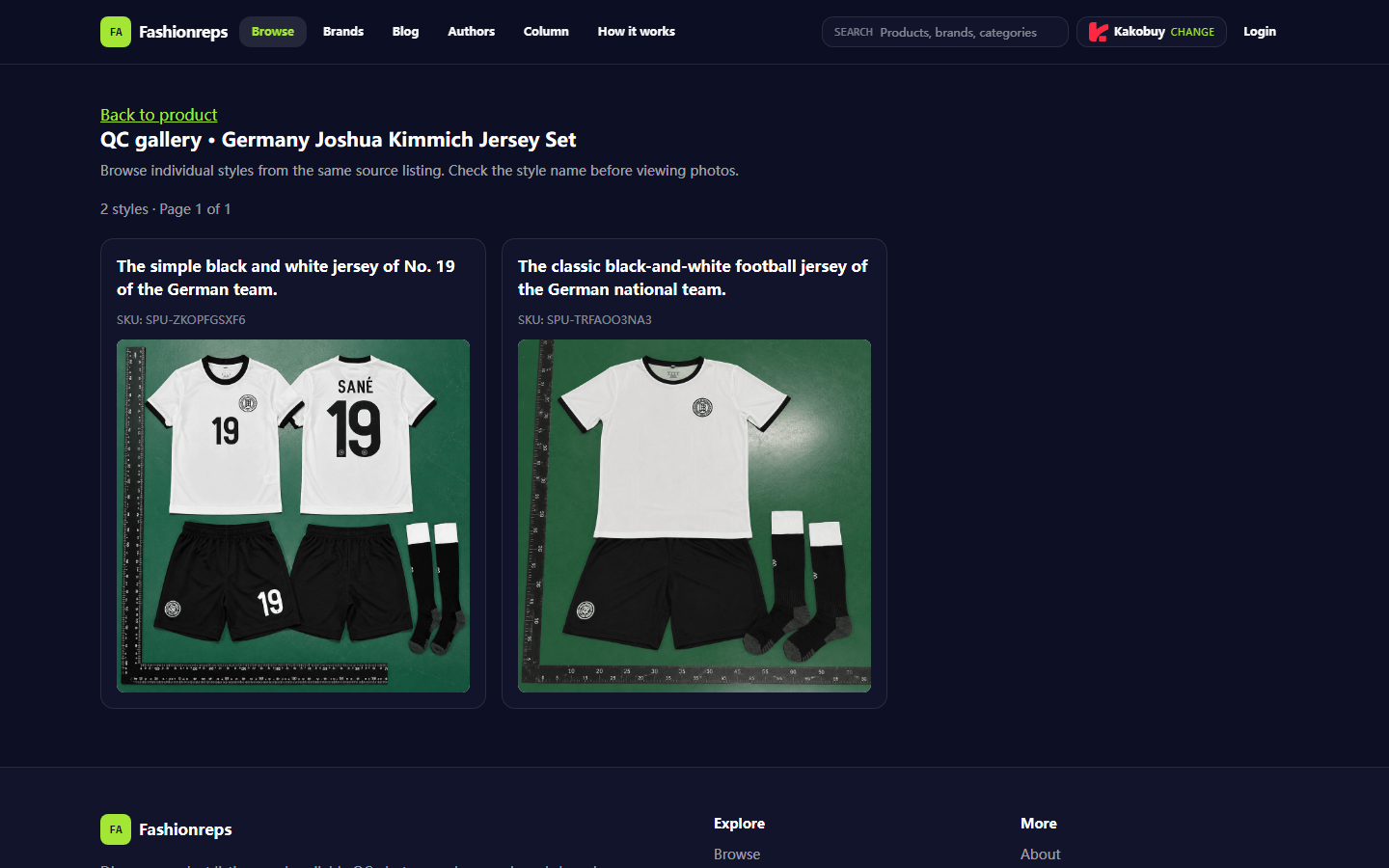
Image: A German Joshua Kimmich jersey candidate visible on the Fashionreps product page and QC page. The image is used to illustrate the page information structure and does not represent independent confirmation of material, sizing, or authenticity.
The germany Jersey Candidate Organization and Verification Task Addressed in This Article
Once completed, you should be able to:
- Create a unique record for each candidate
- Distinguish between facts directly shown on the page and your own notes to be verified
- Compare style names, colors, size information, crest position, and images
- Save the current product link and re-check if the link breaks or the page changes
- Spot situations like "the same item recorded twice" or "image and text mismatch" before ordering
Things not clearly shown on the page—like actual stock, fit, fabric feel, wash performance, or final fit—should be marked as "unverified." Don't fill them in just because the product card or QC images look clear.
First Confirm What's Actually Visible in the Fashionreps Site Spreadsheet: Catalog, Filters, and Product Cards
The "site spreadsheet" here is more like a browsable product catalog, not a freely editable Google Sheets file. Based on the currently visible pages, Fashionreps offers product browsing, brand entries, blogs, authors, site search, and product detail pages. Product pages may also lead to a QC gallery and show different styles from the same source.
Take the German Joshua Kimmich jersey page as an example. The QC page shows 2 styles and lists style names and SKUs separately. The product information visible on the page includes:
- Product or style name
- Color or appearance description
- SKU
- Product images or QC image entrance
- Buttons to enter the product page, QC page, or external purchase agent
- Selectable shopping agent entrances
This information is good for discovering candidates and reviewing images, but it can't automatically replace a size chart. If the page only says "black and white German team jersey" without flat measurements, size chart, or specific dimensions, you should keep "insufficient size data" in your list and not guess based on common jersey sizing.
The "purchase" action on the page may also redirect to a shopping agent chosen by the user. The product discovery page, agent website, order page, and logistics page are different stages. Don't interpret the agent list as Fashionreps having completed the order, payment, or shipment. 🚩
Set Up Fields for Style, Color, Size, Crest, and Link in Google Sheets
It's best to create a header row first, then enter candidates one by one. Don't cram multiple styles, colors, or sizes into the same cell, or filtering will get confusing later.
| Field | What to record | Verification method |
|---|---|---|
| Candidate ID | A unique ID you assign | Check for duplicates |
| Page style name | Original text from product or QC page | Recheck on the current page |
| SKU | SKU shown on the page | Compare character by character with the page |
| Color | Color text on the page, plus image observation if needed | Record text and image separately |
| Size | Size options, size chart, or measurements on the page | Mark as unverified if no data |
| Crest | Crest position, color, visible style | Only describe what's visible in the image |
| Product link | Current product page or QC page link | Open to confirm it still points to the same candidate |
| Image status | Clear front, back, or detail images | Note missing angles |
| Review status | Pending, page verified, needs recheck | Update after each review |
| Notes | Questions to confirm with agent or seller | Don't write questions as conclusions |
The "crest" field should be broken down into observable items as much as possible, such as "black badge visible on left chest," "page image does not show close-up details," or "text does not specify embroidery or print." Don't write "authentic crest," "high-quality crest," or "guaranteed identical" unless there is verifiable and applicable official or product evidence.
Google Sheets' advantage is that you can filter by color, size status, review status, or items with missing images, and you can also add collaborative notes. Its records won't automatically update with Fashionreps pages, so you should still reopen the product page before placing an order. 📋
Compare Page Images, Specs, and Current Link Item by Item for the Same Candidate
Use a fixed order to avoid forming an impression from images first and then looking for text that supports a conclusion:
- Copy the page style name and SKU to create a unique candidate record.
- Record the color and size options explicitly written on the page.
- Look at the front image and note whether the crest is visible and its position clear.
- Check other angles or QC images to confirm that numbers, player names, collars, and main patterns still correspond to the same style.
- Check whether the page link still opens and whether it redirects to another style, an empty page, or a different source.
- Keep "page facts," "image observations," and "items to confirm" separate.
- If there are multiple styles on the page, create separate records; don't use one image to represent all styles.
Images can only support descriptions of visible appearance; they can't prove material, weight, durability, or actual wearing size. Be especially careful with sizing: page options don't equal actual garment measurements, and actual garment measurements don't equal a guaranteed fit for the wearer. Before ordering, compare using data like chest, length, and shoulder width if provided on the page, and factor in your own body measurements and measurement error.
Compare Operational Differences Between Browsing the Site Catalog and Filtering in Google Sheets for Product Discovery
Fashionreps is better for discovering and reviewing candidates. Product cards, images, style pages, and QC galleries preserve the original context, good for confirming "where this record came from." Google Sheets is better for organizing multiple candidates side by side and quickly filtering items that are "missing size chart," "crest details unconfirmed," or "link needs review."
The division of labor can be understood like this:
- Site catalog: discovery, page viewing, source confirmation
- Google Sheets: aggregation, filtering, sorting, collaborative notes
- Original product page: final fact verification
- Shopping agent page: subsequent ordering, payment, and order status
Don't treat the copied content in Google Sheets as a real-time mirror of the site. Product names, links, available sizes, images, and agent entrances can all change. What's saved in the spreadsheet is a working record from a particular review, not a permanently valid proof of inventory.
Note the Applicable Boundaries When Viewing on Mobile, Copying Links, and Returning to the Product Page
Mobile is good for quickly viewing product cards, saving candidate links, and marking items for review, but detailed verification is often limited by screen size, image zoom, and page redirects. Especially for crest edges, collar patterns, number fonts, and small labels, don't judge solely from thumbnails.
When working on mobile, it's recommended to:
- Paste the link into the spreadsheet immediately after copying it, and add the record date
- Don't save only the search results page; save the specific product page or QC page if possible
- After returning to the product page, confirm the page title, SKU, and images are still the same style
- If redirected to an agent page, record the agent name separately; don't overwrite the original product link
- Mark "details not visible" for images that can't be enlarged or are cropped
For multi-person collaboration, use fixed review statuses in Google Sheets, like "pending," "page verified," "needs additional images," or "size pending confirmation." Avoid vague notes like "seen it," "should be fine," or "no problem." ✅
Distinguish Page Facts, Spreadsheet Notes, and Unverified Community Clues
It's suggested to divide information into three layers:
Page facts: product name, SKU, visible color, size options, images, and current link shown on the page.
Spreadsheet notes: your limited descriptions based on images, differences between candidates, reminders to reopen the page.
Community clues: sizing experiences, purchase feedback, and link recommendations mentioned in comments, discussions, or by other users.
Community clues can't be directly upgraded to product facts. If you cite community content, keep the source, publication time, and applicable conditions. If you can't read the entire discussion, mark it as partially read; don't treat a single comment as a general conclusion. For sizing, community experience can only serve as a review prompt, not a replacement for current product page measurements.
Germay Jersey Review, Saving, and Next Steps After Organizing
Before submitting or ordering, check the following items row by row:
- Does each candidate have a unique ID?
- Are different styles, colors, and SKUs distinguished?
- Is the size information actually provided on the page recorded?
- Is the crest visibility described separately, without inferring craftsmanship or authenticity?
- Is the current product page or QC page link saved?
- Are unverified items marked as pending confirmation?
- Have you reopened the links you plan to use?
- Have you confirmed that subsequent agent pages won't replace or confuse the original product records?
This method saves not a fixed amount of money but time by reducing repeated searches, repeated link copying, and mistaking different styles for the same one. The cost is maintaining two sets of information and re-verifying pages before ordering; the longer the spreadsheet goes without updating, the higher the risk of being misled by old links and old size notes.
It suits buyers who need to compare multiple germany jersey candidates, collaborate with others on organizing, or want to keep images and review trails. It's not advisable to rely solely on Google Sheets as the final basis, nor to order directly when the page lacks a size chart, crest details, or the current link won't open. The correct next step is to list the missing fields as questions, then go back to the current product page or confirm with the shopping agent, rather than filling in blanks in the spreadsheet yourself.
Editor score 4.2 / 5